We’re breaking down how to create your first Display campaign in Google Ads to reach your target and boost your sales.
Letting yourself get known online and reaching the audience that is genuinely interested in your product or service requires a digital marketing strategy and patience- a lot of patience. If you want to speed up this process by attracting many users, our recommendation as a 360° marketing agency is to create a Google Display Paid Media campaign.
Googleads, previously known as AdWords, is Google’s pay-per-click (PPC) platform for including advertisements within search results or the ad space on affiliated websites like YouTube or Gmail. We’re going to focus on how to create your first display campaign in the areas mentioned above.
So, what are Google Display Ads? It’s an online advertising platform that consists of a visual component (either an image or a video) that tends to show up on the top or bottom of a website and the side. People will often call these ads banners, and is one of the most popular ad formats since it lets you play with compelling visuals to boost your click-through rate (CTR).
Digital advertising spending continues to grow as a central pillar of organizations’ marketing strategies. According to recent reports from IAB Spain, investment in digital channels has steadily increased throughout the first half of the decade, driven by advances in AI-powered media buying, privacy-first measurement, and the expansion of connected TV. Display formats remain one of the strongest performers, supported by richer creative capabilities and more sophisticated targeting options.
As digital transformation has accelerated well beyond the post-pandemic surge, brands in 2025 are allocating larger portions of their budgets to digital environments to stay competitive, reach fragmented audiences, and adapt to ongoing shifts in consumer behavior.
Creating a display campaign in Google Ads can interest you if:
Google Display ads will let you:
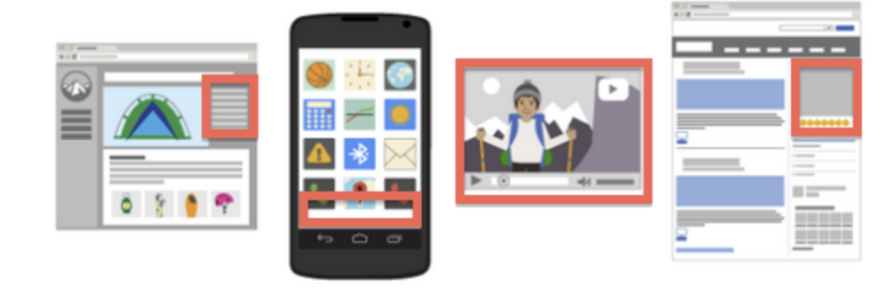
You can publish a wealth of ad designs depending on your brand’s needs within the Display network. You can create ads in the following formats in different sizes:
The ad can consist of:
Once you’ve decided to create a Google Display Ads campaign, the first thing you have to do is create your corporate Google Ads account. From there, you can get started. If you choose, you can follow my instructions using this video:
Besides the video, here’s a brief step-by-step guide for creating your campaign:
The ads show up when the segments you configure for the campaigns, including the audiences, match who’s browsing online.
You can show your ads to users on the Google display network before they start looking for your product, which helps capture the consumer’s attention in the earliest stage of the purchase cycle.
Another option is to remind them of a product they have looked for on your website using remarketing. This technique lets you reconnect with users that already know you and drive their interest once again.
Things to keep in mind when it comes to Google Display Ads
The keywords determine your ads’ location along with related content. It’s also interesting to make a list of negative keywords and add them to your campaign to make sure your ads don’t show up in campaigns related to those terms.
These ads show up on websites related to the themes chosen in the campaign settings and only on the sites that belong to the display network.
Once you set your interests, the ads will show up for relevant users with a set list of categories of interests based on their search and browsing history.
These ads show for tagged users who have visited pages on a website (public lists created based on remarketing codes).
The ads can get segmented to different users based on other parameters, such as their gender and age range.
As you can see, display campaigns have a unique design to improve your branding. Include Paid Media in your digital marketing strategy and get the most out of its possibilities. It’s sure to be a winning combination.